
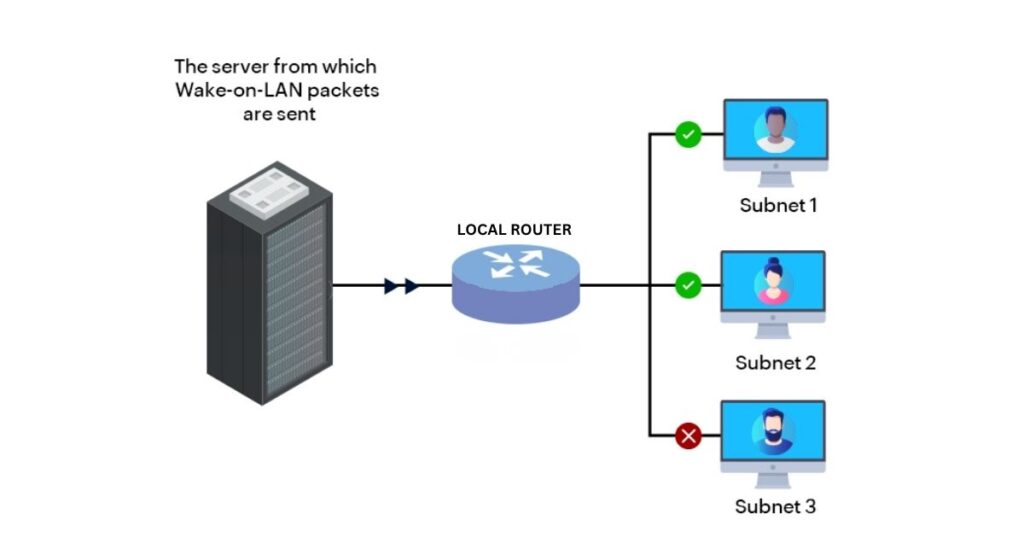
Modern remote server administration relies heavily on uninterrupted network availability. Whether you are managing automated data pipelines, spinning up runtime micro-services, or maintaining persistent SSH loops, having real-time power control over a remote physical server changes the operational landscape.
While keeping hardware persistently running draws continuous power and inflates energy overhead, utilizing Wake-on-LAN (WoL) protocols allows network engineers to leave machines in a low-power sleep state and awaken them programmatically on demand.
Step 1: Satisfying Hardware Framework Requirements
To initialize Wake-on-LAN capabilities, the target architecture must be fundamentally configured to sustain low-level power states to its network interface component. When a system powers down, its motherboard must preserve standby current to either the built-in Ethernet controller or a supported Wireless network chip capable of interpreting a specific data string known as a Magic Packet.
Networking Note: True Wake-on-WLAN (WoWLAN) over a standard USB wireless adapter is notoriously unstable due to internal power-saving protocols cutting electricity to USB buses during low-power modes. For maximum reliability, servers should utilize a dedicated Cat6 wired Ethernet link connected to a local switch, gateway, or dedicated Wi-Fi repeater bridge.
To enable the protocol inside your system architecture:
- Initialize system startup and enter the BIOS/UEFI configuration interface.
- Navigate to advanced hardware configurations, sub-menus labeled Power Management, or ACPI Settings.
- Locate features labeled Wake-up on PCI Event, Power On by PCIE, or Wake on LAN, change the variable status to Enabled, and save the operational configuration.
Step 2: Orchestrating the Protocol on a Local Subnet
Once the hardware infrastructure is ready, the operating system configuration must be aligned to handle the inbound magic data packet. On modern enterprise Linux systems, configuration utilizes standard low-level networking utility packages.
Open your local terminal shell interface and run these structural commands to diagnose and enable the low-level interface rule sets:
# Locate the active default network interface mapping identifier
$ ip route show | grep default

# Verify if your underlying network card interface supports the protocol
$ sudo ethtool [interface_name]
Look closely at the output text fields for the structural descriptor line string: Supports Wake-on: g. The variable g explicitly verifies that the network adapter is engineered to trigger hardware startup routines upon reading standard Magic Packet payloads.
To turn on the interface listener rule instantly, execute:
$ sudo ethtool -s [interface_name] wol gTo guarantee this network logic persists through systemic hardware reboots, network administrators should append the network profile settings or system init scripts to run the configuration natively during startup loops.
Cross-Platform Implementation Blueprint
Enabling the underlying hardware components to accept a network-directed power-on command varies drastically depending on your operating system layer. Use this master architectural map to configure your target device:
| Operating System | Low-Level Hardware Requirement | Required OS Activation Settings / Terminal Command | Modern Deployment Limitations |
| Windows 11 / 10 | Device Manager ACPI Power Management parameters enabled. | Advanced Control Panel -> Network Connections -> Properties -> Configure -> Power Management | Modern Standby ($S0$) natively blocks traditional WoL; requires specific network driver overrides. |
| macOS (Apple Silicon / Intel) | “Wake for network access” rule enabled inside energy registers. | System Settings -> Battery -> Options -> Turn on "Wake for network access" | Apple Silicon hardware requires a persistent local iCloud Sleep Proxy (Apple TV / HomePod) to parse WAN WoL. |
| Linux (Ubuntu / RHEL) | Motherboard UEFI PCIE wake event vectors enabled. | Run: sudo ethtool -s [interface] wol g (Must be appended to system startup profiles for persistence) | Wi-Fi network interface cards lack sustained power links; requires wired Cat6 infrastructure. |
Overcoming Modern Standby Failures (Windows 11)
If you are attempting to route a Magic Packet to a modern Windows 11 machine and find that it refuses to boot, the system is likely trapped in Modern Standby ($S0$). Unlike legacy $S3$ sleep states—which powered down the CPU entirely while keeping the network interface card listening—Modern Standby keeps the operating system connected in a shallow idle loop, frequently ignoring standard hardware interrupt loops like Wake-on-LAN.
To bypass this framework limitation and force Windows to honor hardware-level wake requests, administrators must modify the system registry to block deep sleep state overrides.
The Network Adapter Override Routine:
- Open the Windows search interface, type
regedit, and execute the Registry Editor with administrative privileges. - Drill down into the background directory pathway exactly as follows:
HKEY_LOCAL_MACHINE\SYSTEM\CurrentControlSet\Control\Power - Right-click the empty space in the right-hand layout field, select
New -> DWORD (32-bit) Value, and label the entry variable exactly:PlatformAoAcOverride - Double-click your newly constructed key, change the value variable data field to
0, and hit OK. - Exit the registry architecture layout and restart the system hardware.
Next, open your system Device Manager, navigate down to your primary network controller properties, enter the Advanced tab, locate the string variable “Wake on Magic Packet from power off state”, and make sure its logic rule is explicitly adjusted to Enabled. This forces the network adapter to maintain an active listening state even when the core desktop operating system enters a deeper low-power phase. While cloud automation scales deployment efficiency, hardening your localized system endpoints remains a core priority, as examined in our blueprint on Windows printer security.
Step 3: Magic Packet Architecture & Remote WAN Routing
A true Wake-on-LAN data transmission consists of a payload layer containing 6 bytes of continuous synchronization data (represented as 0xFF hex bytes) followed instantly by 16 repetitions of the target machine’s unique physical MAC address.
Because routers do not inherently preserve internal IP mapping registers for sleeping hardware, standard Wide Area Network (WAN) routing paths require specific gateway configurations:
Comparative Analysis: Remote WAN Routing Methods
| Integration Method | Required Infrastructure | Security Risk Status | Implementation Complexity |
| Direct Port Forwarding | Public WAN IP / Port Forwarding UDP 7 or 9 | High Risk (Exposes open ports to global scanner bots) | Minimal Setup Requirements |
| Custom Gateway (OpenWrt) | Compatible Third-Party Router Firmware | Medium Risk (Requires regular firewall updates) | Moderate Technical Threshold |
| The Local Insider Model | Always-On Low-Power Device (Raspberry Pi 5 / SSH) | Highly Secure (Protected via custom keys behind standard SSH) | Advanced System Engineering |
Deep-Dive: Deploying the Local Insider Strategy
The gold standard for enterprise network architecture is the Local Insider Model. Rather than opening vulnerable broadcast ports to public web spaces, administrators leave a highly secured, low-overhead micro-PC (such as a Raspberry Pi running a standard Linux shell) active inside the local subnet.
To wake up your master remote computing hardware from anywhere across the globe, simply map a custom external port to your insider’s SSH daemon, authenticate safely using secure asymmetric cryptographic key pairs, and execute the standard network wake command natively within the local subnet area:
$ sudo etherwake -i [insider_interface_identifier] [target_machine_mac_address]Using this network model, your public boundary firewall remains entirely locked down against unsolicited WAN scanning routines while giving you immediate, command-line power management access to your infrastructure pipelines worldwide.
Frequently Asked Questions (FAQ)
What is a Wake-on-LAN “Magic Packet”?
A Magic Packet is a specific, low-level network broadcast layer frame. The payload architecture consists of a continuous synchronization string of 6 bytes of hexadecimal 0xFF, followed immediately by 16 continuous repetitions of the target machine’s unique 48-bit physical MAC address. Because it operates at the Data Link layer (Layer 2), it can be read by a network interface card even when the main operating system is completely offline.
Why does traditional Wake-on-LAN fail over a public internet path (WAN)?
By default, Wake-on-LAN is built for local subnets (LAN) because routers do not permanently map IP addresses to physical ports for devices that are asleep. When a computer powers down, its entry drops out of the router’s ARP (Address Resolution Protocol) cache within a few minutes. If you send a remote packet from the internet to a specific IP, the router handles it as unroutable data and drops it because it no longer knows which physical network port connects to that hardware.
How does the “Local Insider” strategy fix remote routing security issues?
Directly forwarding public WAN UDP ports (like Port 7 or 9) to your local broadcast address opens your home or corporate gateway to malicious global scanner bots that constantly flood networks with data strings. The Local Insider model uses a highly secured, low-power micro-device (like an active Raspberry Pi) as a trusted gateway inside your network perimeter. You securely SSH into the insider using asymmetric key authentication, and command it to fire a clean, localized broadcast packet directly across the internal subnet, keeping your external firewall completely locked down.
What is a Wake-on-LAN “Magic Packet”?
A Magic Packet is a Layer 2 broadcast frame containing a synchronization string of 6 bytes of hexadecimal 0xFF, followed by 16 repetitions of the target machine’s unique MAC address. Because it operates at the Data Link layer, a network card can read it even when the primary operating system is completely powered down.
Why does traditional Wake-on-LAN fail over the internet (WAN)?
Traditional WoL fails over WAN because routers flush a sleeping computer’s entry from their ARP (Address Resolution Protocol) cache within minutes of power-off. When a remote packet hits the router from the internet, the gateway drops the data because it can no longer map the target IP address to a physical network port.
How does the “Local Insider” strategy protect the network?
Directly forwarding public WAN ports to a local subnet exposes your network perimeter to malicious global scanner bots. The “Local Insider” model bypasses this by routing a secure external SSH connection into an always-on micro-device (like a Raspberry Pi), which then fires a safe, localized broadcast packet entirely within your firewall boundary.
Why is Wake-on-LAN unstable on Apple Silicon Macs?
Apple Silicon architectures handle low-power states via unified system sleep loops that require a local Apple “Sleep Proxy” (like an Apple TV or HomePod) on the subnet. The proxy maintains a live Bonjour registration of the sleeping Mac and wakes it instantly only when an authorized local service query—like an internal SSH or file-sharing request—is initiated.